7 Best Project Management Software for Solopreneurs in 2025
- Discover 10 fundamentals of project management
- Understand step-by-step plans for PM execution
- Learn tips to avoid 5 common mistakes by beginners
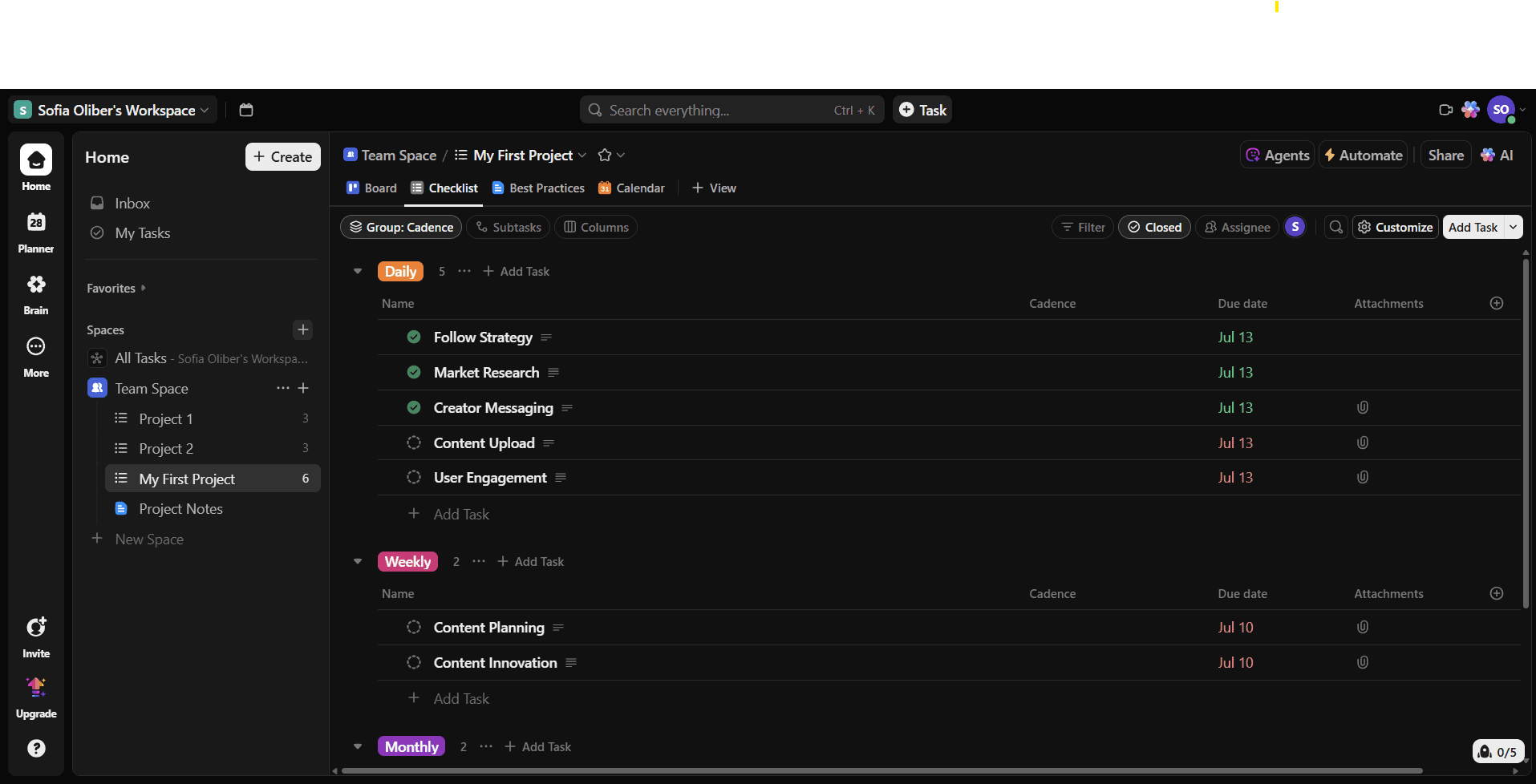
You can choose dark or light mode on ClickUp.
ClickUp is a good solution for entrepreneurs in search of a complete yet intuitive software solution. Within the ClickUp platform, users can find lists, tables, documents, goals and dashboards. It’s competent enough to help you plan an entire business sales pipeline and expand it later. Plus, the templates, task assignment options and dashboards are ideal for maximizing productivity.
For example, a competitive freelance designer can use ClickUp to manage projects and client requests, set up weekly sprints, track hours spent on each project, and monitor changes and edits.
ClickUp Key Features for Solopreneurs:
Where ClickUp truly shines is in its flexibility. While it can take some time to master the interface, once you’re there it feels great. Creating dashboards and linking goals to important tasks is a simple and practical way to keep productivity up. Additionally, the fields and columns in your projects are fully personalizable.
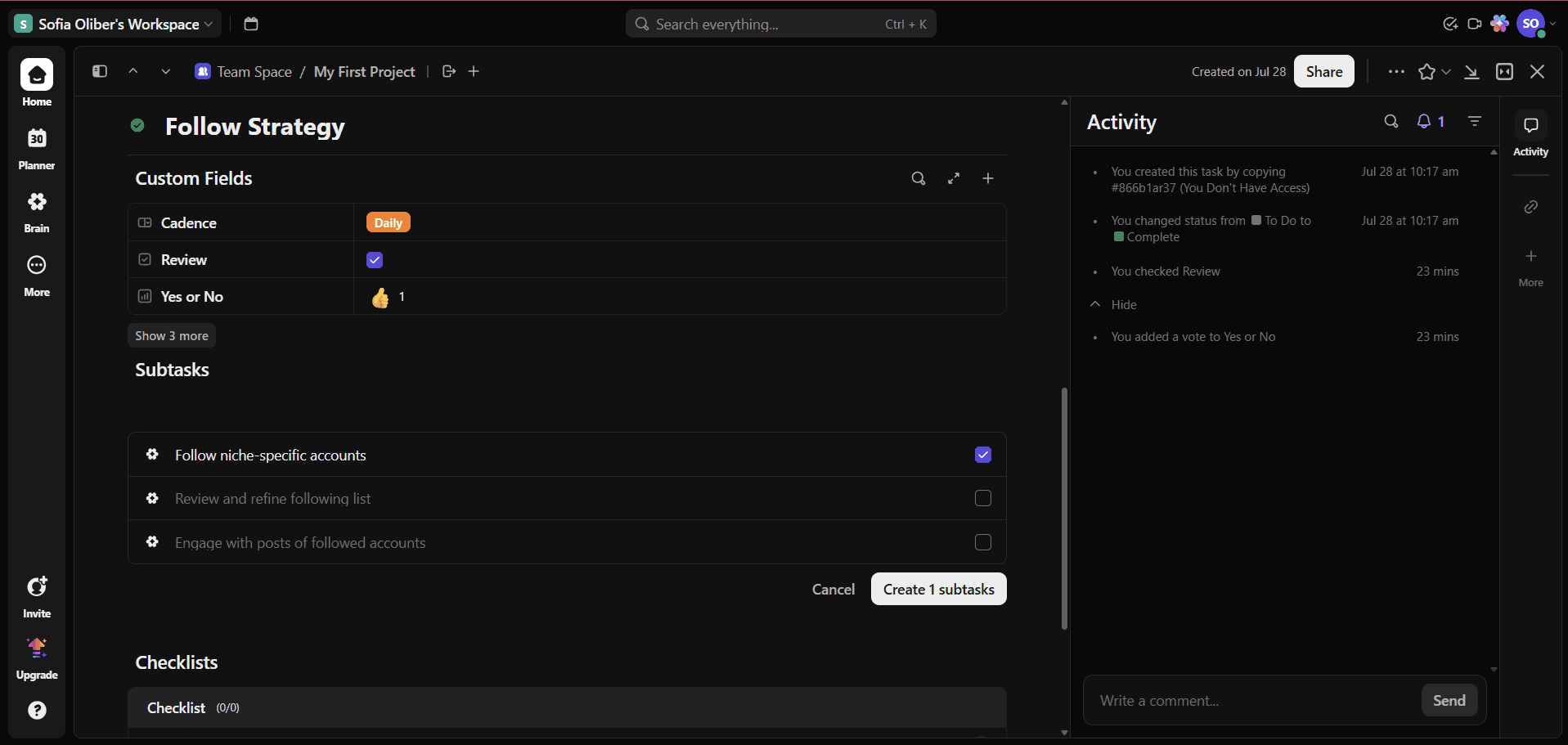
You can see your custom fields in the checklist view or in the task description.
ClickUp’s AI assistant, Brain, is also worth mentioning. It can suggest options when creating new tasks, fields, projects and more, and you can ask it questions. The mobile version is more limited than the desktop version, but that’s typical on other platforms as well. The app version doesn’t feel as intuitive and optimized for small screens as it could be, though.
The free plan is solid for solopreneurs, as it includes unlimited tasks and members. However, the best deal is the Unlimited plan, which starts at $7 per month per user — with no minimum users — and adds features like more integrations with third-party apps and more than 1,000 automations.
The higher tiers are Business and Enterprise, which unlock more advanced reporting and admin tools that solopreneurs probably won’t need unless they’re planning to bring on a team. To learn more about the service, read our ClickUp review or try any of its plans yourself. You can also count on the 30-day money-back guarantee if it’s not the right fit.

Free Forever
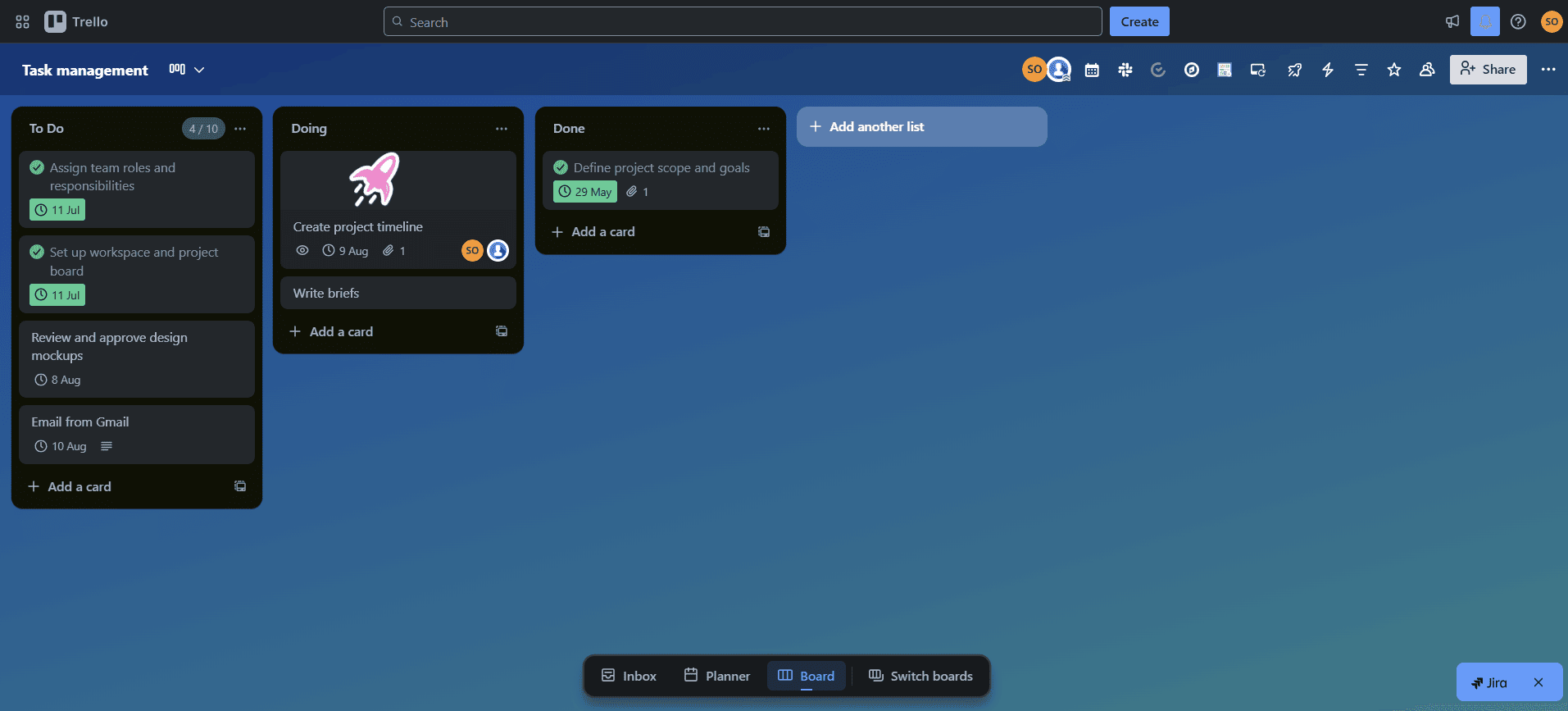
Sometimes a simple kanban board is more than enough
If Trello is anything, it’s “easy” and “visual.” Trello’s kanban board system makes it one of the simplest project management platforms available. You can easily get the hang of it in a matter of minutes or hours, and its drag-and-drop functionalities make it very user-friendly.
Additionally, the platform is highly customizable and scalable thanks to its extensive and free power-up menu. If you feel like you’re missing a feature while using Trello, give the power-up menu a look — you might find the answer you need.
Trello Key Features for Solopreneurs:
Creating boards and lists in Trello is fast and fun; you can quickly build your project workflow and add extra features like the calendar power-up, even on the free plan. You can customize colors, change the background and add stickers, which improves the platform’s already visually appealing interface.
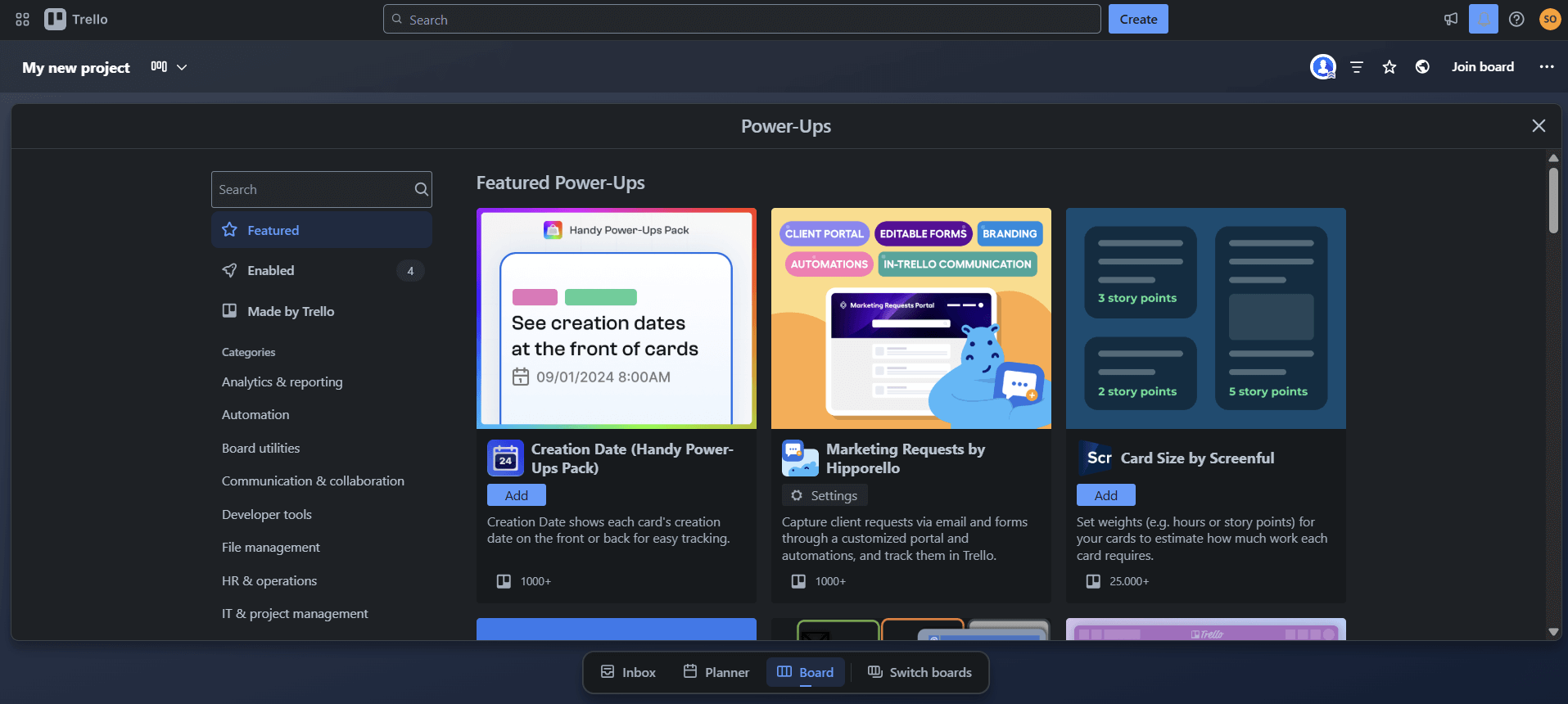
Trello power-ups are a great way to enhance boards.
Even Trello’s automations are simple and easy to use, but the options available with the free version are quite limited. The automations are better and more supportive when you upgrade to a paid plan.
Unlike other project management tools, Trello offers a solid free plan for beginners, with unlimited cards and power-ups. The Premium plan is the perfect balance of simplicity and functionality for solopreneurs. For $10 per month, you get advanced features such as more views and workspace-level templates. You can learn more in our full Trello review, or try any plan to get started.

Free
Standard
Premium
Enterprise
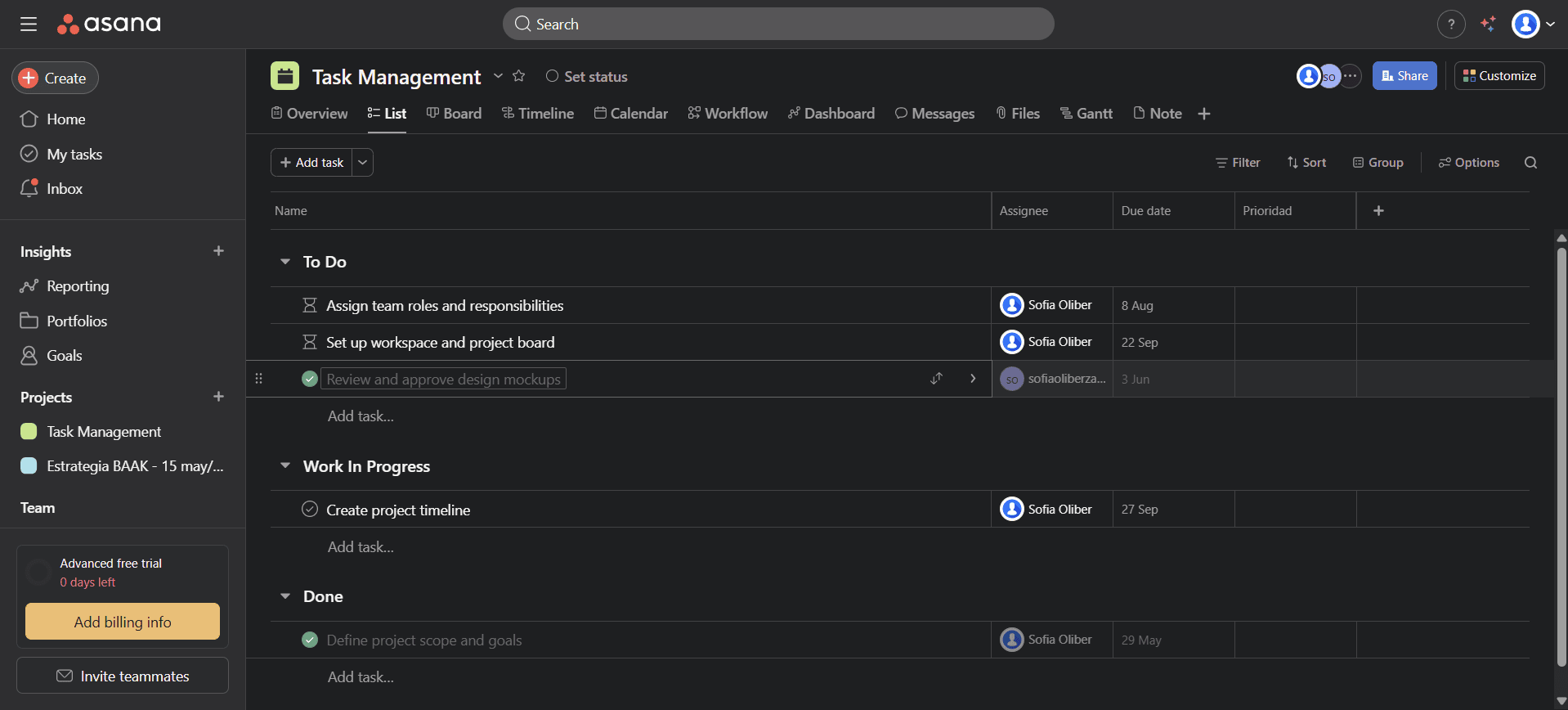
Managing structured workflows is easy with Asana’s interface.
Love for Asana comes from realizing how easy it is to structure projects with this tool. Users can break down their projects into sections, tasks and subtasks while visualizing their workflow with different views. This system is ideal when running multiple projects and subtasks at once — a workflow to which solopreneurs are no strangers.
Pre-built templates and automation features are also handy for saving valuable time. Solo business owners such as designers or developers managing complex clients with big deliverables and multi-step projects can truly benefit from Asana’s interface. Although Asana’s free plan is limited, it still offers amazing value, making it one of the best free project management tools.
Asana Key Features for Solopreneurs:
The interface is a mix of simplicity and professionalism. Creating projects and tasks and assigning them is intuitive. The option to link subtasks with a general goal is ideal for projects with competitive goals. Almost everything feels neatly organized, and the left-hand sidebar helps you jump between workspaces with zero friction.
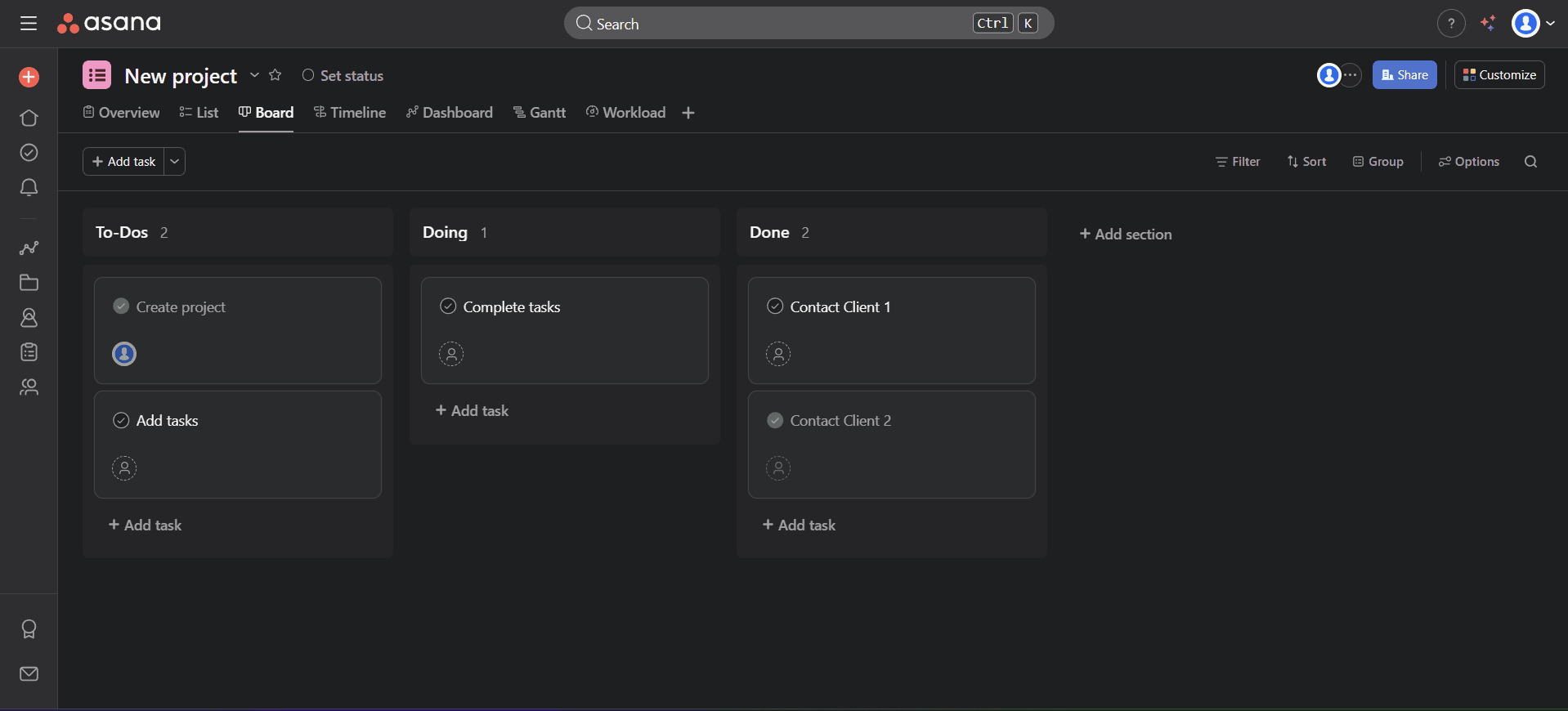
Asana’s free version includes a kanban board view.
Asana also lets you quickly switch between views depending on the insights you want to visualize. Plus, Asana’s templates are quite good and usually need only minimal editing. You can also choose between dark and light mode on this platform.
Asana offers an excellent free option for individuals and small teams. If you want more advanced features, its best deal is the Starter plan, which costs $10.99 per month per user and adds automations, milestones and timeline views. The Advanced plan has a big jump in price and includes advanced tools like reporting and admin tools that solopreneurs likely won’t need.
Read our Asana review to learn more about specific differences between plan options. You can try any of the paid plans with the generous 30-day free trial.

Starter
Advanced
Enterprise
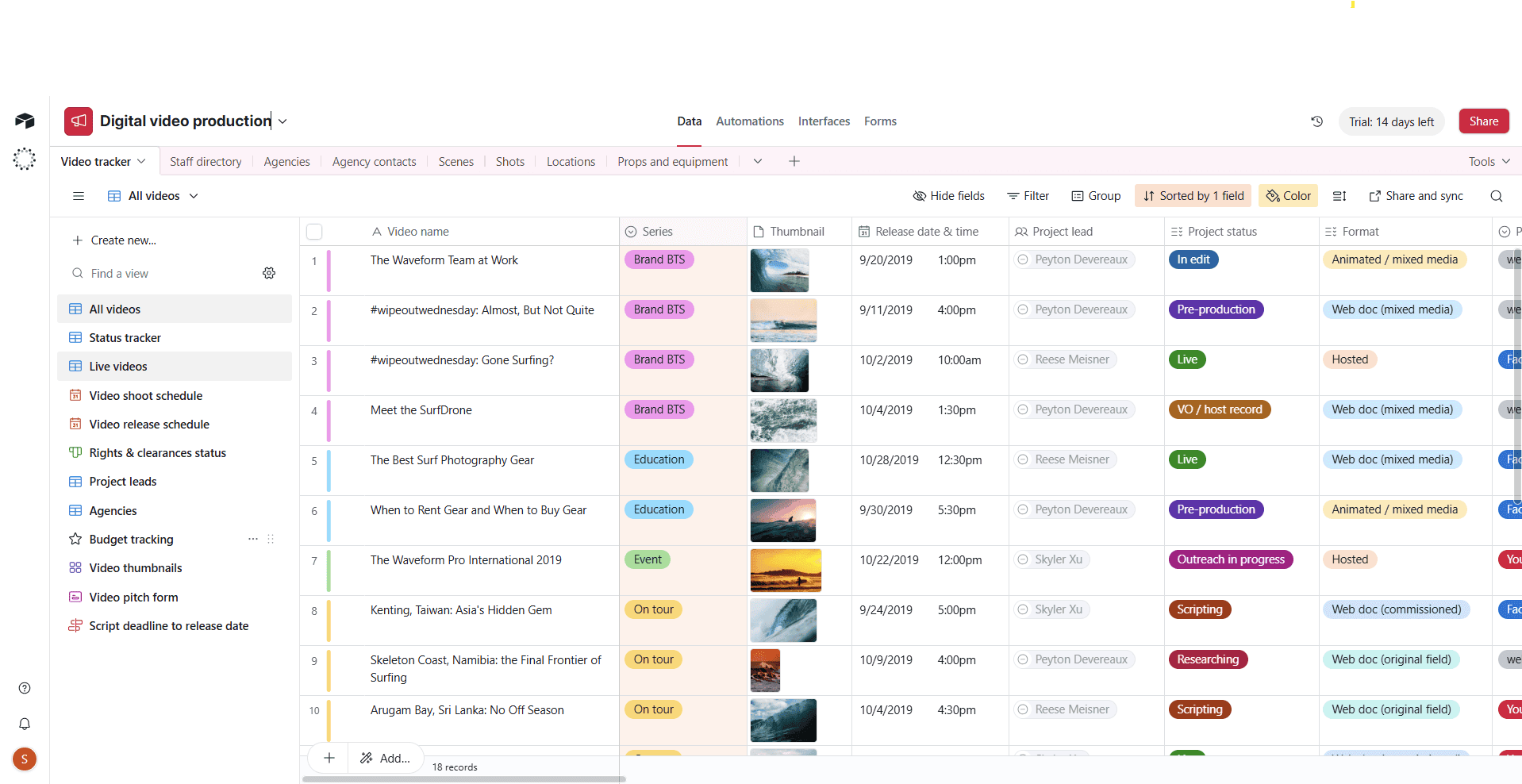
Airtable’s spreadsheet hybrid offers the perfect blend of data-driven and visual solutions.
If a database and a spreadsheet had a baby, it would be Airtable. This software can come in super handy when organizing complex information and projects that change over time.
However, if you are not a fan of spreadsheets, you might find its interface a bit overwhelming.
A marketing manager trying to launch an online course could use Airtable for many purposes. They could track important tasks and monitor progress in the grid view, manage content in the gallery view and oversee the general project in the calendar timeline. Airtable can bring many perspectives to a single project.
Airtable Key Features for Solopreneurs:
While Airtable’s interface is complete and modern, it can also be a bit overwhelming. The learning process can feel like an uphill battle. However, once you’ve conquered it, you can utilize advanced features such as task automation and customization, and invite collaborators to your projects.
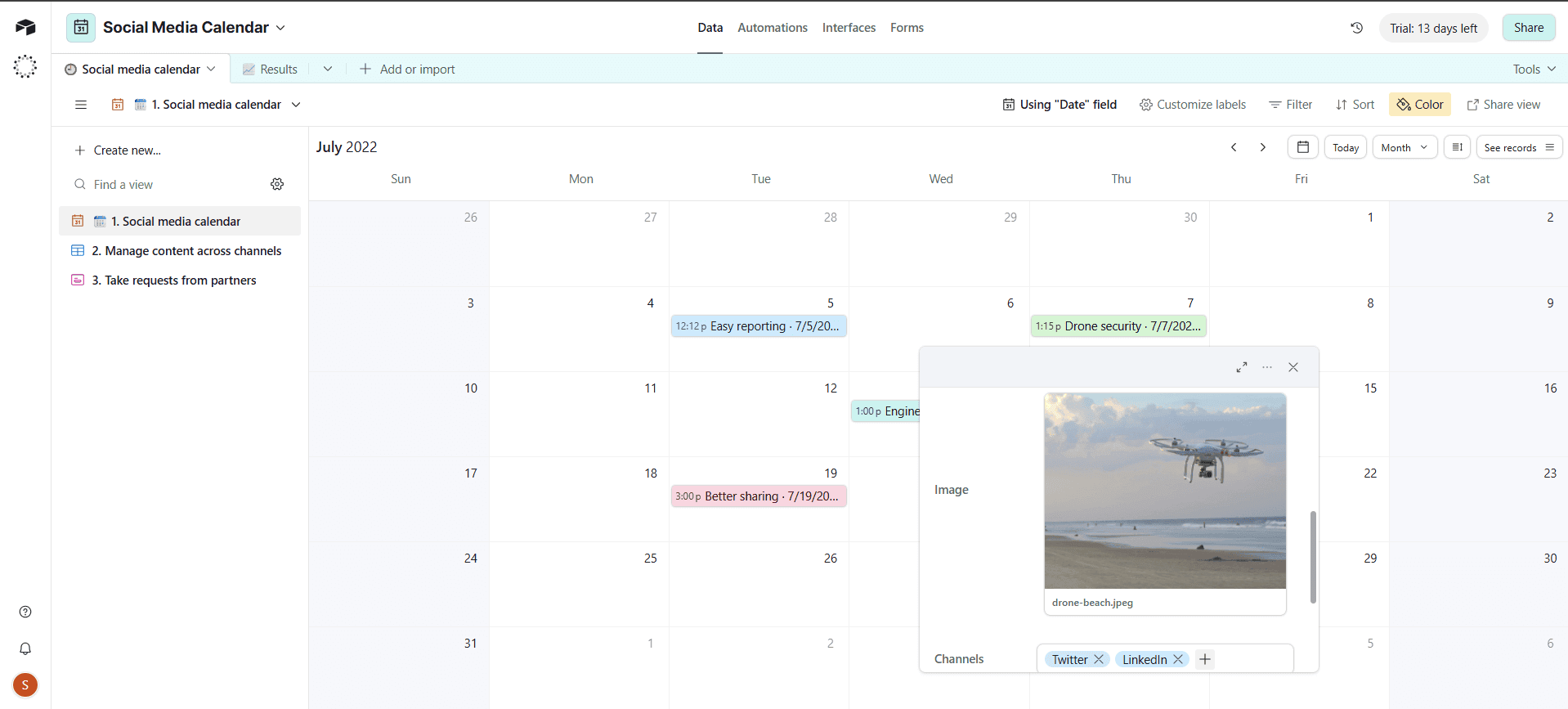
Solopreneurs in need of creating a quick and organized content calendar will love the social media calendar template.
Airtable excels at social media management templates to ease marketing professionals’ work. Each social media post is added as a date, with complete descriptions and all the media attached, whether that be a video, an image or another file type. Additionally, each workspace can be changed and personalized depending on the user’s needs.
Airtable’s free option offers unlimited bases and 1,000 records, which are items within a board. The Team plan offers the best value, at $20 per month, and includes a Gantt chart view and 50,000 records per base. The Business and Enterprise plans involve a huge jump in price and may be too much for a solopreneur in need of something simpler.
You can give Airtable a chance with its 14-day free trial, or read our full Airtable review to learn more about its features.

Free
Team
Business
Enterprise
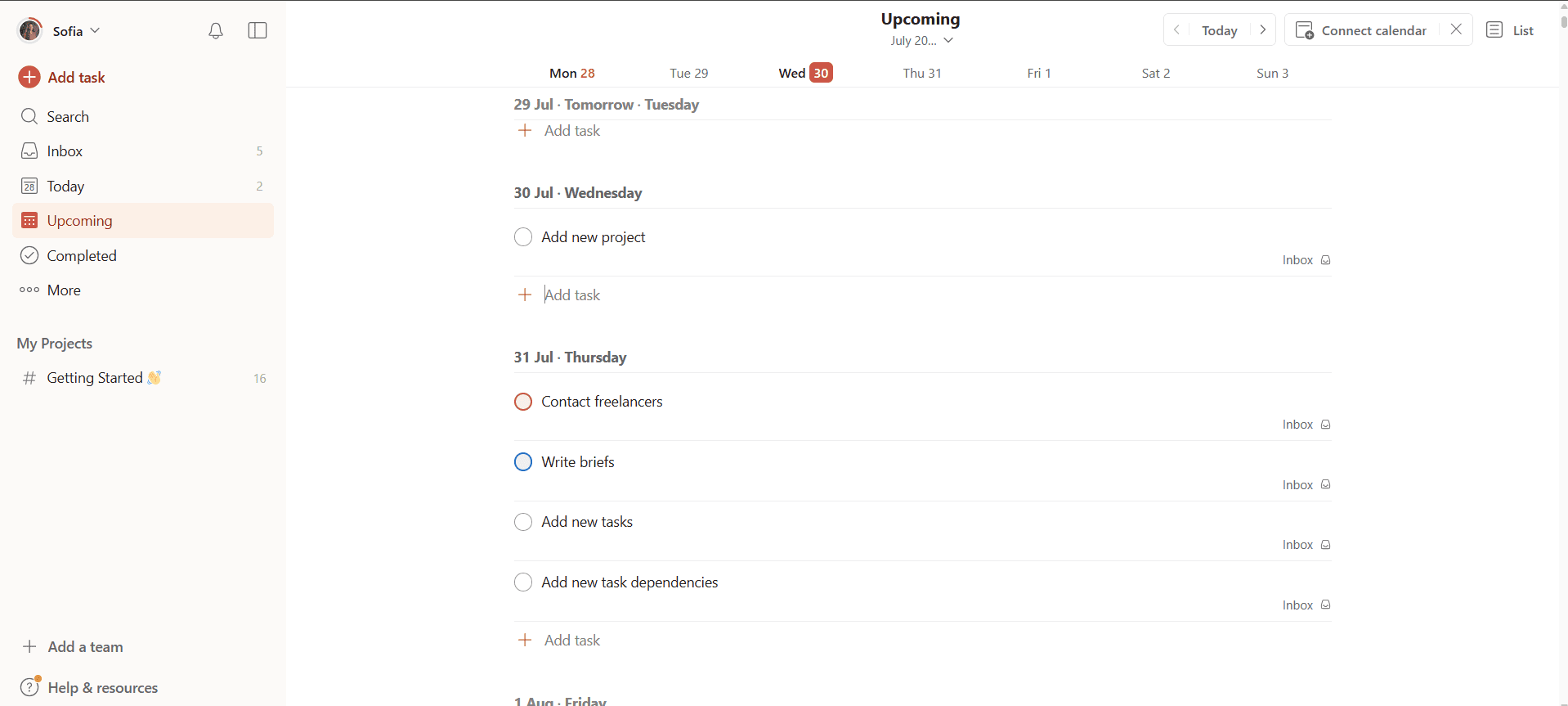
The Todoist interface is simple and ideal for focused solo work.
Despite including powerful features like automations and reminders, Todoist is truly more of a task management tool than a project management tool. It’s perfect for solopreneurs who want to get work done without distraction and maintain a minimalist visual approach to their to-dos. The platform allows users to organize tasks with priorities, tags and schedules.
At its core, Todoist is a great tool for managing routines and creating habits. Let’s say you have a newsletter. Todoist makes it easy to break down repetitive tasks like “do the research,” “write the newsletter” and “schedule send,” while automatically assigning them to your weekly or monthly workflow.
Todoist Key Features for Solopreneurs:
The biggest advantage of Todoist is its distraction-free and minimalist interface. The learning curve is almost nonexistent, and you can quickly learn how to categorize and organize your tasks.
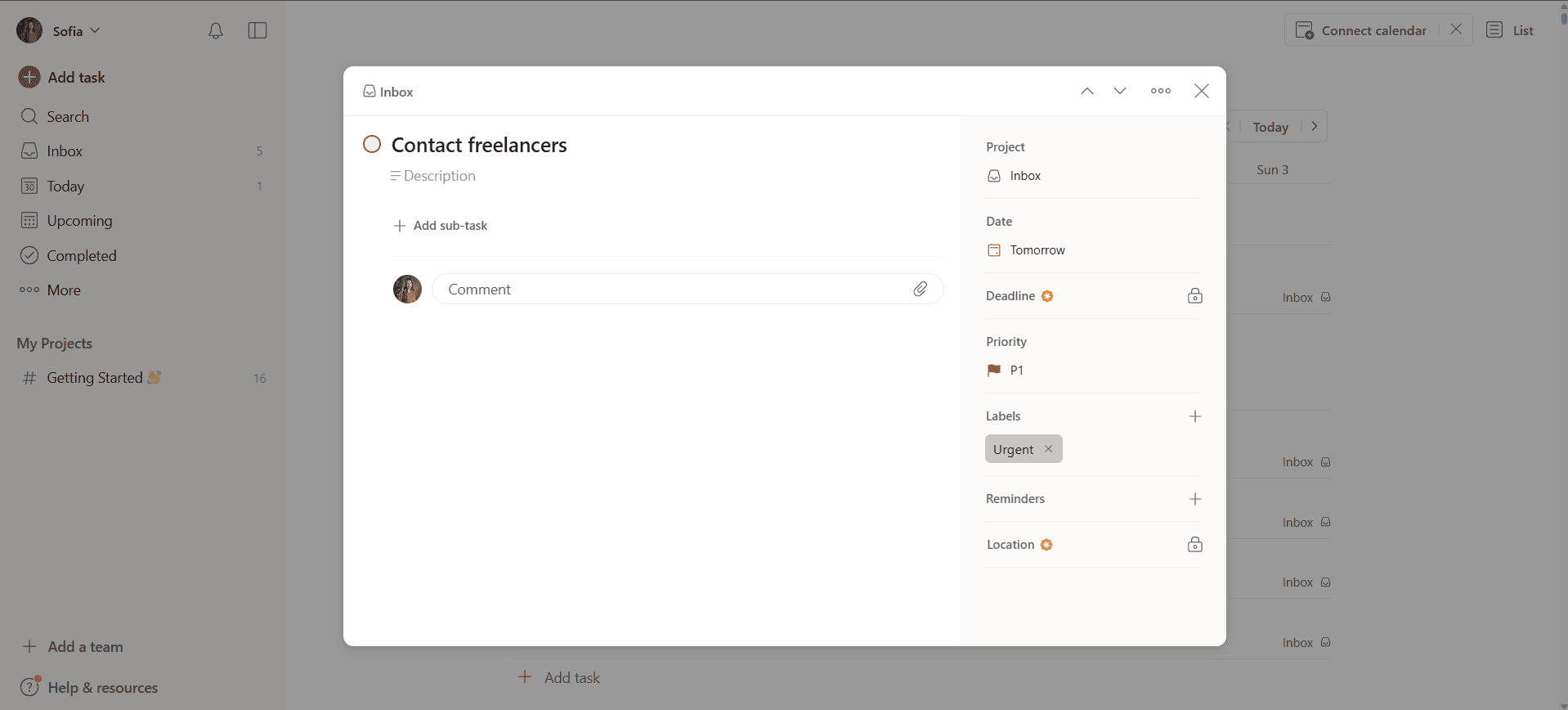
Add custom task reminders with any paid plan.
The mobile app deserves a special mention for its responsive and easy layout. This comes as no surprise, though, given the original app’s minimalism. However, more advanced project managers will feel the lack of advanced features like views, complete reports and complex communication tools, which is the main downside of the platform.
Todoist’s free plan includes five active projects, as well as basic filters and automations. The Pro plan is the best option, as it unlocks custom task reminders, deadlines and an AI assistant for just $4 per month.
Todoist is one of the most affordable tools out there. Check out our full Todoist review to learn more about it.

Free
Pro
Business
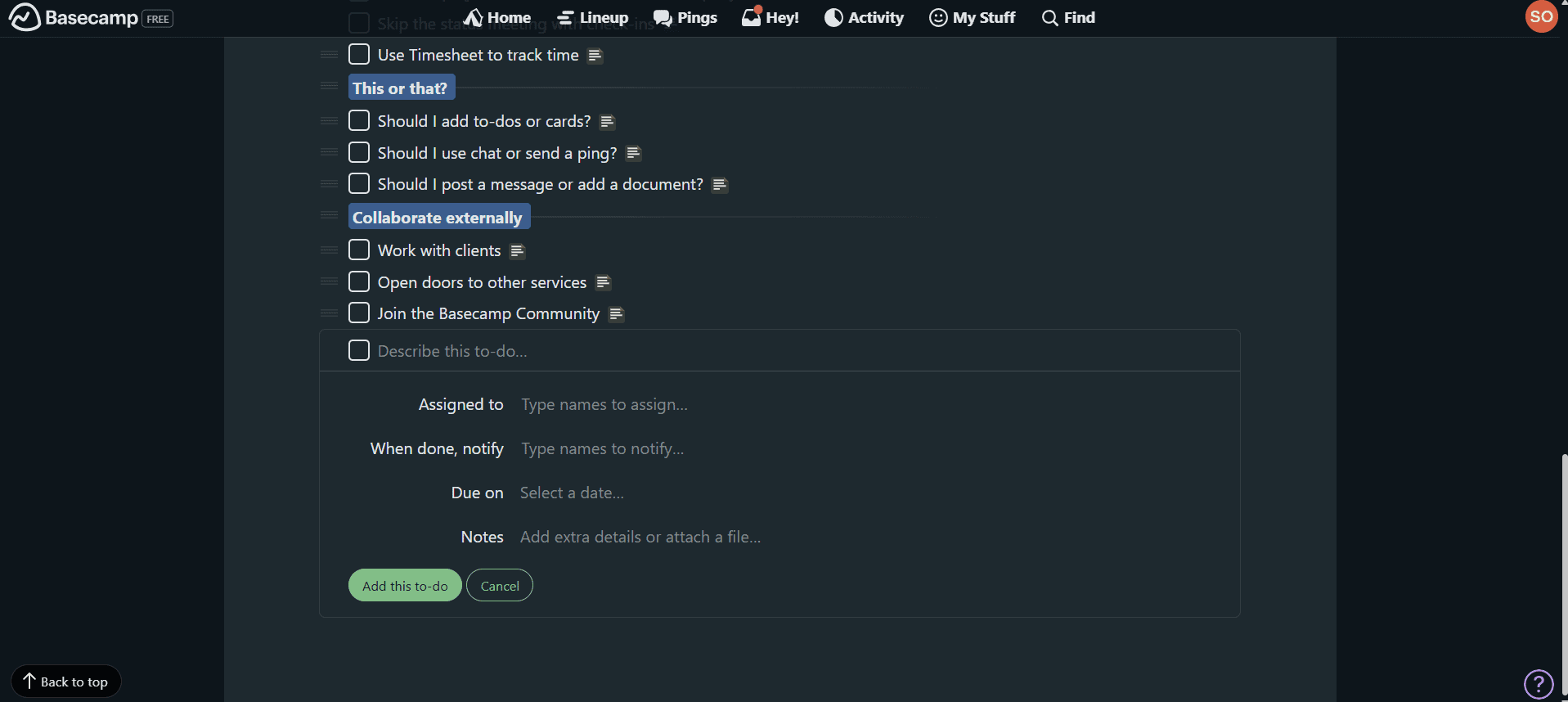
You can assign and add notes, due dates and notifications to your tasks in Basecamp.
[provider teaser block]
Basecamp’s interface feels very different from the rest of the project management tools on this list — it acts more like an online workspace where users can handle parts of a project separately. It’s great for entrepreneurs who need a platform to complete client work, share files, track progress and communicate efficiently.
On a paid plan, you can create a separate project for each client and even dedicate a space for elements like messages, documents and task lists. Basecamp also has a group chat option that could work as an alternative to email messaging or Slack, making it perfect for more centralized communication.
Basecamp Key Features for Solopreneurs:
Basecamp’s interface feels fresh and original. Although it includes similar features to other robust project management tools, the layout is different. Creating new projects and workflows takes just a few steps. However, similar to Todoist, Basecamp might feel more like a task management tool, as it lacks built-in complex tools for project management.
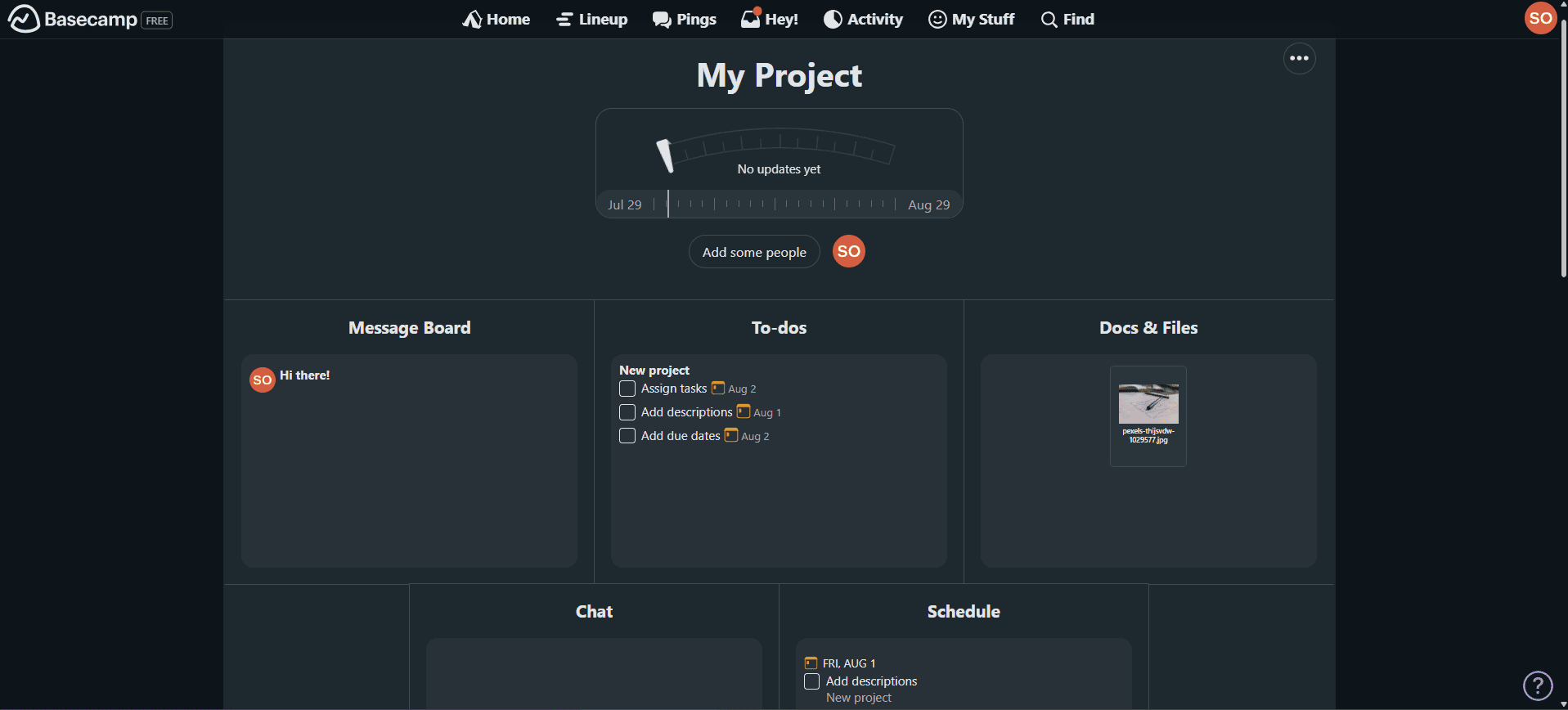
All project previews in Basecamp have a similar appearance.
The collaboration tools are very useful, but the rest of the tools are a bit limited for complicated projects. Moreover, these communication tools are useful for solopreneurs only if they maintain constant communication with their collaborators or clients.
Basecamp’s pricing includes a per-month and a flat-rate option. There’s also a free alternative that supports one project and 1GB of storage. When considering value for money, Basecamp Plus is the best option for individuals, at $15 per month.
You can try Basecamp Plus free for 30 days, or learn more about this innovative tool in our comprehensive Basecamp review.

Free
Basecamp Plus
Basecamp Pro Unlimited
Though not strictly a project management tool, Google Workspace can be used to manage simple tasks and projects. The service comes with a host of apps, cloud storage and even web hosting with a domain for your business. It is also great for collaborating, storing all your data and managing documents.
A freelancer could divide clients’ deliverables into different shared folders while managing their personal task flow in another project management software like Trello or Asana.
Because Workspace encompasses many Google services, such as Google Drive, Gmail and Google Calendar, Workspace can be a useful central hub. Plus, once you feel ready, you can integrate your Google account with most popular project management apps on the market.
Google Workspace Key Features for Solopreneurs:
Some people might think that Google Workspace only includes Google Drive functionalities for storing photos or creating documents, but it’s actually quite a comprehensive tool. If used smartly, Google Workspace can assist in creating presentations for clients, setting up spreadsheets for budgeting, managing files and advanced options like hosting your brand’s domain.
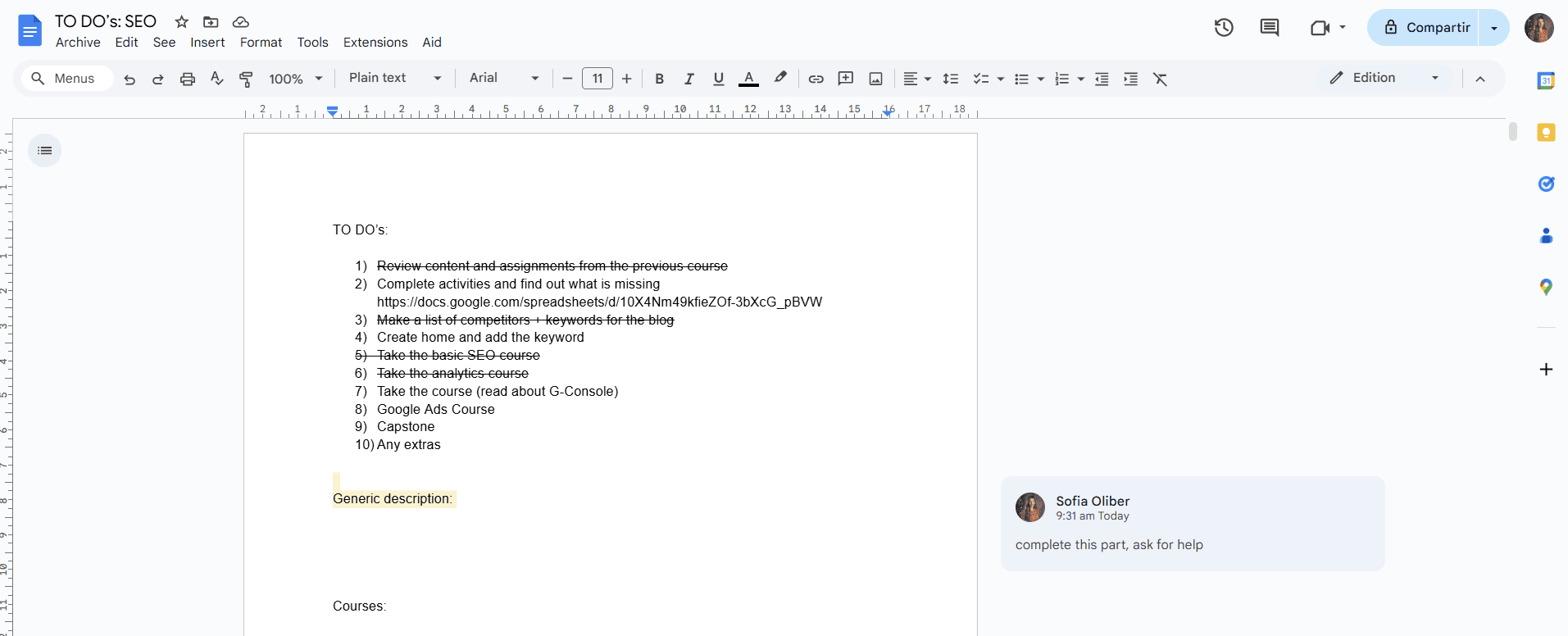
You can leave as many comments as you want in documents and resolve them once they’ve been addressed.
Google Workspace is naturally not built to track tasks or project goals, but it works perfectly as part of a larger infrastructure. Collaboration is where Google Workspace shines, as options like co-editing documents in real time, assigning action items and receiving notifications make it much more valuable than a simple text or spreadsheet processor.
Some people might think that Google Workspace only includes Google Drive functionalities for storing photos or creating documents, but it’s actually quite a comprehensive tool. If used smartly, Google Workspace can assist in creating presentations for clients, setting up spreadsheets for budgeting, managing files and advanced options like hosting your brand’s domain.
Google Workspace is naturally not built to track tasks or project goals, but it works perfectly as part of a larger infrastructure. Collaboration is where Google Workspace shines, as options like co-editing documents in real time, assigning action items and receiving notifications make it much more valuable than a simple text or spreadsheet processor.
Google Workspace Essentials is the 15GB free plan, but if you’re a solopreneur handling many files, you can try its paid options for 14 days with its free trial. Paid plans start at an affordable $7 per user per month with the Starter plan, which includes 30GB of pooled storage, custom business email, Meet, and AI tools.
To learn more about what this tool can do for you, read our Google Workspace review or try Essentials for free.

Business Starter
Business Standard
Google Workspace for Nonprofits
Business Plus
Solopreneurs need reliable and efficient structures to manage their many responsibilities. It’s easy to get overwhelmed or forget about important tasks when working in chaos. Project management tools can help solo business owners stay organized, focused and productive.
The right project management software can not only assist solopreneurs with organization and task management but also make the whole process more efficient by saving time. As a solopreneur, you might find the learning curve tough with new software, but you will gain a lasting advantage if you push through.
There is no such thing as a perfect project management platform. Some have visual interfaces, like Trello, while some are highly customizable and feel like a perfect mix of it all, like ClickUp. Most have free trials and money-back guarantees. Try a few out — you could even end up using more than one.
Which tools resonated with you the most? Have you tried any of them before? Are you considering trying any in particular? Leave your thoughts in the comment section. Thanks for reading.
ClickUp is the best project management tool for solopreneurs, as it includes advanced features and an intuitive interface. Other great tools for solopreneurs are Trello and Asana.
The best project management software for freelancers is Trello due to its simplicity and ease of use. Its user-friendly interface makes it a great tool for individuals and small teams who need quick solutions in just a few clicks.
Yes, Asana is good for solopreneurs thanks to its comprehensive interface, task hierarchy and management features. Other great project management tools for entrepreneurs are Trello, ClickUp and Airtable.
Solopreneurs understand the hustle of managing many different duties at the same time. They usually perform tasks that go from budgeting to content creation to client management. Over time, this pivoting of work can become exhausting to manage. That’s where the best project management software for solopreneurs can save the day.
Management tools can help any solo business owner stay organized and productive while taking some of the burden off their shoulders. Features like automations, templates and automatic reports can make a significant difference in a solopreneur’s daily routine.
If you want to stop being an octopus worker juggling endless tasks on your own, this guide is for you. Unlike our general roundup of the best project management tools, here we’ve ranked the best options based on what most solopreneurs need. Once you understand how these tools function and get them working for you, it’ll feel like having a personal assistant.

For solopreneurs who need flexibility without sacrificing simplicity and swiftness, I recommend ClickUp. You can set up tasks, create documents and manage due dates all in one place. It also offers automations and more than 1,000 integrations, like Gmail and Slack, to enhance communication with clients.
I’ll admit that learning to master it may take some time, but it’s worth it once you’ve fully integrated it into your routine. You can try ClickUp for free, or give ClickUp’s Unlimited plan a try to see if it’s the right fit for you. If it doesn’t work, you can always appeal to the 100% money-back guarantee policy.
When choosing the right project management tools for solopreneurs, we kept their needs in mind and focused on simplicity, speed, price and overall routine optimization. Solopreneurs might not be managing big teams, but they are dealing with a lot of tasks alone. This is exactly why usability and efficiency mattered the most when making our decisions.

You can choose dark or light mode on ClickUp.
ClickUp is a good solution for entrepreneurs in search of a complete yet intuitive software solution. Within the ClickUp platform, users can find lists, tables, documents, goals and dashboards. It’s competent enough to help you plan an entire business sales pipeline and expand it later. Plus, the templates, task assignment options and dashboards are ideal for maximizing productivity.
For example, a competitive freelance designer can use ClickUp to manage projects and client requests, set up weekly sprints, track hours spent on each project, and monitor changes and edits.
ClickUp Key Features for Solopreneurs:
Where ClickUp truly shines is in its flexibility. While it can take some time to master the interface, once you’re there it feels great. Creating dashboards and linking goals to important tasks is a simple and practical way to keep productivity up. Additionally, the fields and columns in your projects are fully personalizable.
You can see your custom fields in the checklist view or in the task description.
ClickUp’s AI assistant, Brain, is also worth mentioning. It can suggest options when creating new tasks, fields, projects and more, and you can ask it questions. The mobile version is more limited than the desktop version, but that’s typical on other platforms as well. The app version doesn’t feel as intuitive and optimized for small screens as it could be, though.
The free plan is solid for solopreneurs, as it includes unlimited tasks and members. However, the best deal is the Unlimited plan, which starts at $7 per month per user — with no minimum users — and adds features like more integrations with third-party apps and more than 1,000 automations.
The higher tiers are Business and Enterprise, which unlock more advanced reporting and admin tools that solopreneurs probably won’t need unless they’re planning to bring on a team. To learn more about the service, read our ClickUp review or try any of its plans yourself. You can also count on the 30-day money-back guarantee if it’s not the right fit.
Free Forever
Sometimes a simple kanban board is more than enough
If Trello is anything, it’s “easy” and “visual.” Trello’s kanban board system makes it one of the simplest project management platforms available. You can easily get the hang of it in a matter of minutes or hours, and its drag-and-drop functionalities make it very user-friendly.
Additionally, the platform is highly customizable and scalable thanks to its extensive and free power-up menu. If you feel like you’re missing a feature while using Trello, give the power-up menu a look — you might find the answer you need.
Trello Key Features for Solopreneurs:
Creating boards and lists in Trello is fast and fun; you can quickly build your project workflow and add extra features like the calendar power-up, even on the free plan. You can customize colors, change the background and add stickers, which improves the platform’s already visually appealing interface.
Trello power-ups are a great way to enhance boards.
Even Trello’s automations are simple and easy to use, but the options available with the free version are quite limited. The automations are better and more supportive when you upgrade to a paid plan.
Unlike other project management tools, Trello offers a solid free plan for beginners, with unlimited cards and power-ups. The Premium plan is the perfect balance of simplicity and functionality for solopreneurs. For $10 per month, you get advanced features such as more views and workspace-level templates. You can learn more in our full Trello review, or try any plan to get started.
Free
Standard
Premium
Enterprise
Managing structured workflows is easy with Asana’s interface.
Love for Asana comes from realizing how easy it is to structure projects with this tool. Users can break down their projects into sections, tasks and subtasks while visualizing their workflow with different views. This system is ideal when running multiple projects and subtasks at once — a workflow to which solopreneurs are no strangers.
Pre-built templates and automation features are also handy for saving valuable time. Solo business owners such as designers or developers managing complex clients with big deliverables and multi-step projects can truly benefit from Asana’s interface. Although Asana’s free plan is limited, it still offers amazing value, making it one of the best free project management tools.
Asana Key Features for Solopreneurs:
The interface is a mix of simplicity and professionalism. Creating projects and tasks and assigning them is intuitive. The option to link subtasks with a general goal is ideal for projects with competitive goals. Almost everything feels neatly organized, and the left-hand sidebar helps you jump between workspaces with zero friction.
Asana’s free version includes a kanban board view.
Asana also lets you quickly switch between views depending on the insights you want to visualize. Plus, Asana’s templates are quite good and usually need only minimal editing. You can also choose between dark and light mode on this platform.
Asana offers an excellent free option for individuals and small teams. If you want more advanced features, its best deal is the Starter plan, which costs $10.99 per month per user and adds automations, milestones and timeline views. The Advanced plan has a big jump in price and includes advanced tools like reporting and admin tools that solopreneurs likely won’t need.
Read our Asana review to learn more about specific differences between plan options. You can try any of the paid plans with the generous 30-day free trial.
Starter
Advanced
Enterprise
Airtable’s spreadsheet hybrid offers the perfect blend of data-driven and visual solutions.
If a database and a spreadsheet had a baby, it would be Airtable. This software can come in super handy when organizing complex information and projects that change over time.
However, if you are not a fan of spreadsheets, you might find its interface a bit overwhelming.
A marketing manager trying to launch an online course could use Airtable for many purposes. They could track important tasks and monitor progress in the grid view, manage content in the gallery view and oversee the general project in the calendar timeline. Airtable can bring many perspectives to a single project.
Airtable Key Features for Solopreneurs:
While Airtable’s interface is complete and modern, it can also be a bit overwhelming. The learning process can feel like an uphill battle. However, once you’ve conquered it, you can utilize advanced features such as task automation and customization, and invite collaborators to your projects.
Solopreneurs in need of creating a quick and organized content calendar will love the social media calendar template.
Airtable excels at social media management templates to ease marketing professionals’ work. Each social media post is added as a date, with complete descriptions and all the media attached, whether that be a video, an image or another file type. Additionally, each workspace can be changed and personalized depending on the user’s needs.
Airtable’s free option offers unlimited bases and 1,000 records, which are items within a board. The Team plan offers the best value, at $20 per month, and includes a Gantt chart view and 50,000 records per base. The Business and Enterprise plans involve a huge jump in price and may be too much for a solopreneur in need of something simpler.
You can give Airtable a chance with its 14-day free trial, or read our full Airtable review to learn more about its features.
Free
Team
Business
Enterprise
The Todoist interface is simple and ideal for focused solo work.
Despite including powerful features like automations and reminders, Todoist is truly more of a task management tool than a project management tool. It’s perfect for solopreneurs who want to get work done without distraction and maintain a minimalist visual approach to their to-dos. The platform allows users to organize tasks with priorities, tags and schedules.
At its core, Todoist is a great tool for managing routines and creating habits. Let’s say you have a newsletter. Todoist makes it easy to break down repetitive tasks like “do the research,” “write the newsletter” and “schedule send,” while automatically assigning them to your weekly or monthly workflow.
Todoist Key Features for Solopreneurs:
The biggest advantage of Todoist is its distraction-free and minimalist interface. The learning curve is almost nonexistent, and you can quickly learn how to categorize and organize your tasks.
Add custom task reminders with any paid plan.
The mobile app deserves a special mention for its responsive and easy layout. This comes as no surprise, though, given the original app’s minimalism. However, more advanced project managers will feel the lack of advanced features like views, complete reports and complex communication tools, which is the main downside of the platform.
Todoist’s free plan includes five active projects, as well as basic filters and automations. The Pro plan is the best option, as it unlocks custom task reminders, deadlines and an AI assistant for just $4 per month.
Todoist is one of the most affordable tools out there. Check out our full Todoist review to learn more about it.
Free
Pro
Business
You can assign and add notes, due dates and notifications to your tasks in Basecamp.
[provider teaser block]
Basecamp’s interface feels very different from the rest of the project management tools on this list — it acts more like an online workspace where users can handle parts of a project separately. It’s great for entrepreneurs who need a platform to complete client work, share files, track progress and communicate efficiently.
On a paid plan, you can create a separate project for each client and even dedicate a space for elements like messages, documents and task lists. Basecamp also has a group chat option that could work as an alternative to email messaging or Slack, making it perfect for more centralized communication.
Basecamp Key Features for Solopreneurs:
Basecamp’s interface feels fresh and original. Although it includes similar features to other robust project management tools, the layout is different. Creating new projects and workflows takes just a few steps. However, similar to Todoist, Basecamp might feel more like a task management tool, as it lacks built-in complex tools for project management.
All project previews in Basecamp have a similar appearance.
The collaboration tools are very useful, but the rest of the tools are a bit limited for complicated projects. Moreover, these communication tools are useful for solopreneurs only if they maintain constant communication with their collaborators or clients.
Basecamp’s pricing includes a per-month and a flat-rate option. There’s also a free alternative that supports one project and 1GB of storage. When considering value for money, Basecamp Plus is the best option for individuals, at $15 per month.
You can try Basecamp Plus free for 30 days, or learn more about this innovative tool in our comprehensive Basecamp review.
Free
Basecamp Plus
Basecamp Pro Unlimited
Though not strictly a project management tool, Google Workspace can be used to manage simple tasks and projects. The service comes with a host of apps, cloud storage and even web hosting with a domain for your business. It is also great for collaborating, storing all your data and managing documents.
A freelancer could divide clients’ deliverables into different shared folders while managing their personal task flow in another project management software like Trello or Asana.
Because Workspace encompasses many Google services, such as Google Drive, Gmail and Google Calendar, Workspace can be a useful central hub. Plus, once you feel ready, you can integrate your Google account with most popular project management apps on the market.
Google Workspace Key Features for Solopreneurs:
Some people might think that Google Workspace only includes Google Drive functionalities for storing photos or creating documents, but it’s actually quite a comprehensive tool. If used smartly, Google Workspace can assist in creating presentations for clients, setting up spreadsheets for budgeting, managing files and advanced options like hosting your brand’s domain.
You can leave as many comments as you want in documents and resolve them once they’ve been addressed.
Google Workspace is naturally not built to track tasks or project goals, but it works perfectly as part of a larger infrastructure. Collaboration is where Google Workspace shines, as options like co-editing documents in real time, assigning action items and receiving notifications make it much more valuable than a simple text or spreadsheet processor.
Some people might think that Google Workspace only includes Google Drive functionalities for storing photos or creating documents, but it’s actually quite a comprehensive tool. If used smartly, Google Workspace can assist in creating presentations for clients, setting up spreadsheets for budgeting, managing files and advanced options like hosting your brand’s domain.
Google Workspace is naturally not built to track tasks or project goals, but it works perfectly as part of a larger infrastructure. Collaboration is where Google Workspace shines, as options like co-editing documents in real time, assigning action items and receiving notifications make it much more valuable than a simple text or spreadsheet processor.
Google Workspace Essentials is the 15GB free plan, but if you’re a solopreneur handling many files, you can try its paid options for 14 days with its free trial. Paid plans start at an affordable $7 per user per month with the Starter plan, which includes 30GB of pooled storage, custom business email, Meet, and AI tools.
To learn more about what this tool can do for you, read our Google Workspace review or try Essentials for free.
Business Starter
Business Standard
Google Workspace for Nonprofits
Business Plus
Solopreneurs need reliable and efficient structures to manage their many responsibilities. It’s easy to get overwhelmed or forget about important tasks when working in chaos. Project management tools can help solo business owners stay organized, focused and productive.
The right project management software can not only assist solopreneurs with organization and task management but also make the whole process more efficient by saving time. As a solopreneur, you might find the learning curve tough with new software, but you will gain a lasting advantage if you push through.
There is no such thing as a perfect project management platform. Some have visual interfaces, like Trello, while some are highly customizable and feel like a perfect mix of it all, like ClickUp. Most have free trials and money-back guarantees. Try a few out — you could even end up using more than one.
Which tools resonated with you the most? Have you tried any of them before? Are you considering trying any in particular? Leave your thoughts in the comment section. Thanks for reading.
ClickUp is the best project management tool for solopreneurs, as it includes advanced features and an intuitive interface. Other great tools for solopreneurs are Trello and Asana.
The best project management software for freelancers is Trello due to its simplicity and ease of use. Its user-friendly interface makes it a great tool for individuals and small teams who need quick solutions in just a few clicks.
Yes, Asana is good for solopreneurs thanks to its comprehensive interface, task hierarchy and management features. Other great project management tools for entrepreneurs are Trello, ClickUp and Airtable.